Digital menu & table ordering in the PhilippinesNo more idle waiting at the table.
Guests tap or scan the table and the whole menu is on their phone: photos, prices, spice, sizes, how many each dish feeds. They order when they're ready, and it goes straight to your waiter.
From₱3,000a year
- Menu in one tap or scan
- Questions answered on the dish
- Order when they're ready
- Call the waiter with a tap
Same table. Same kitchen.
One table waits for a menu, a waiter and answers about the dish. The other is already eating.
The kitchen is just as fast for both. With tapndine the order simply gets there sooner, because nobody at the table had to wait to place it.
Every wait, gone.
Five times a table sits and waits for a waiter, and what tapndine puts there instead.
Before: Waiting for the menu
With tapndine: It opens on their phone with a tap or a scan.
Before: Waiting for a waiter to take the order
With tapndine: They send it from the table, when they're ready.
Before: Waiting to ask what's in a dish, how spicy, how big
With tapndine: Photo, spice, how many it feeds, sizes and price are on the dish.
Before: Waiting for the menu again, to order more
With tapndine: The menu stays on their phone. They send another round.
Before: Waving for the bill
With tapndine: They tap Ask for the bill, and the waiter sees it.
Every question, answered on the dish.
Every dish shows its photo, price, how spicy it is and how many people it feeds, with sizes and add-ons where you offer them. Guests search, filter by Seafood or Pork, and see what's sold out before they ask.
1
tap or scan to open
0
apps to install
Your waiters stop answering and start serving.
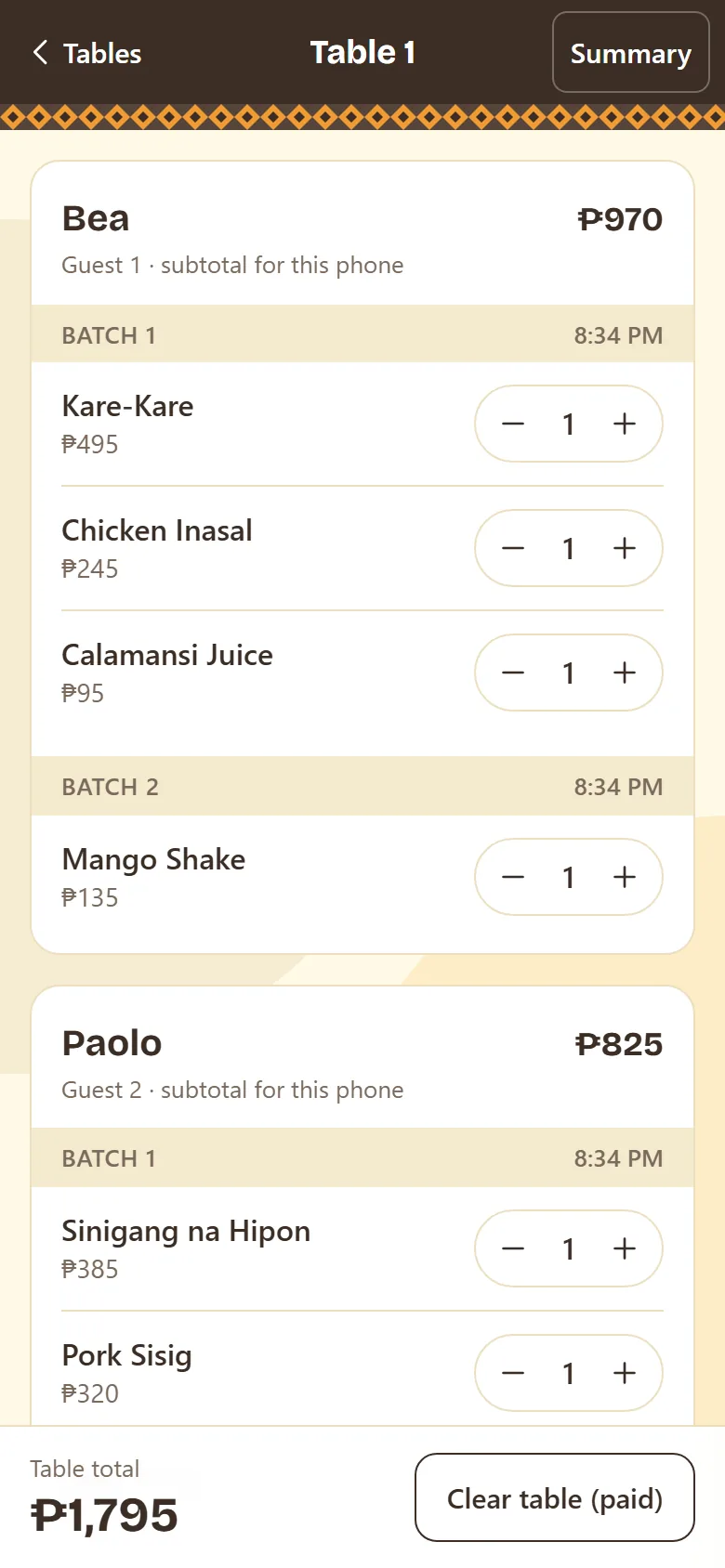
Each guest's order arrives on the waiter's phone under the name they chose, sorted by guest. Your waiter reads it back, keys it into your POS and brings the food, instead of walking back and forth for menus and questions.
- Guest names
- Order rounds
- Read-back fixes
- Waiter-added items
- Table totals
- Clear table
- Waiter logins
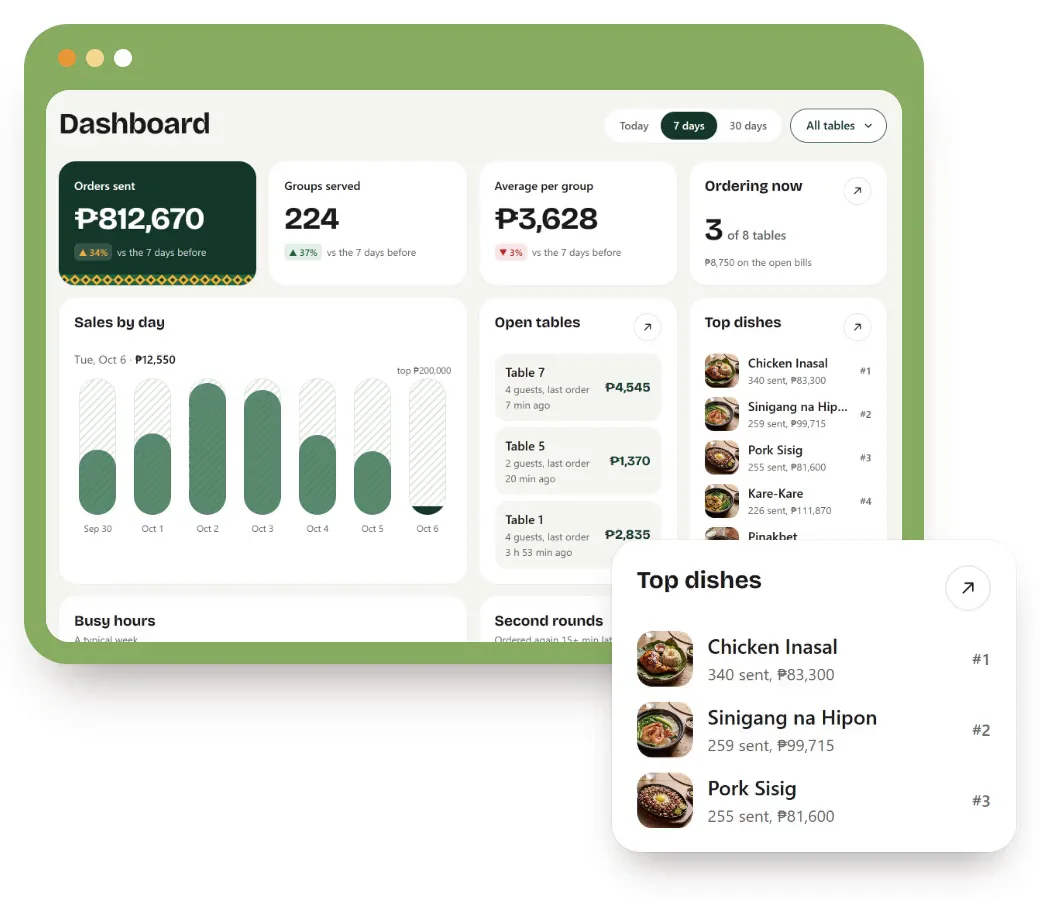
A bonus: see what sells, and when you're busy.
On top of the orders, every one is counted, so the manager can see sales by day, the busiest hours of the week, which dishes lead and which nobody orders, how long groups stay, and which tables earn the most.
- Today, 7 days or 30 days
- Busy hours by weekday
- Dish ranking, best to never ordered
- One table at a time, or all of them
From sitting down to ordering, in four steps.
Put each table's QR code on it. Guests do the rest from their own phones, and your waiters see every order the moment it's sent.
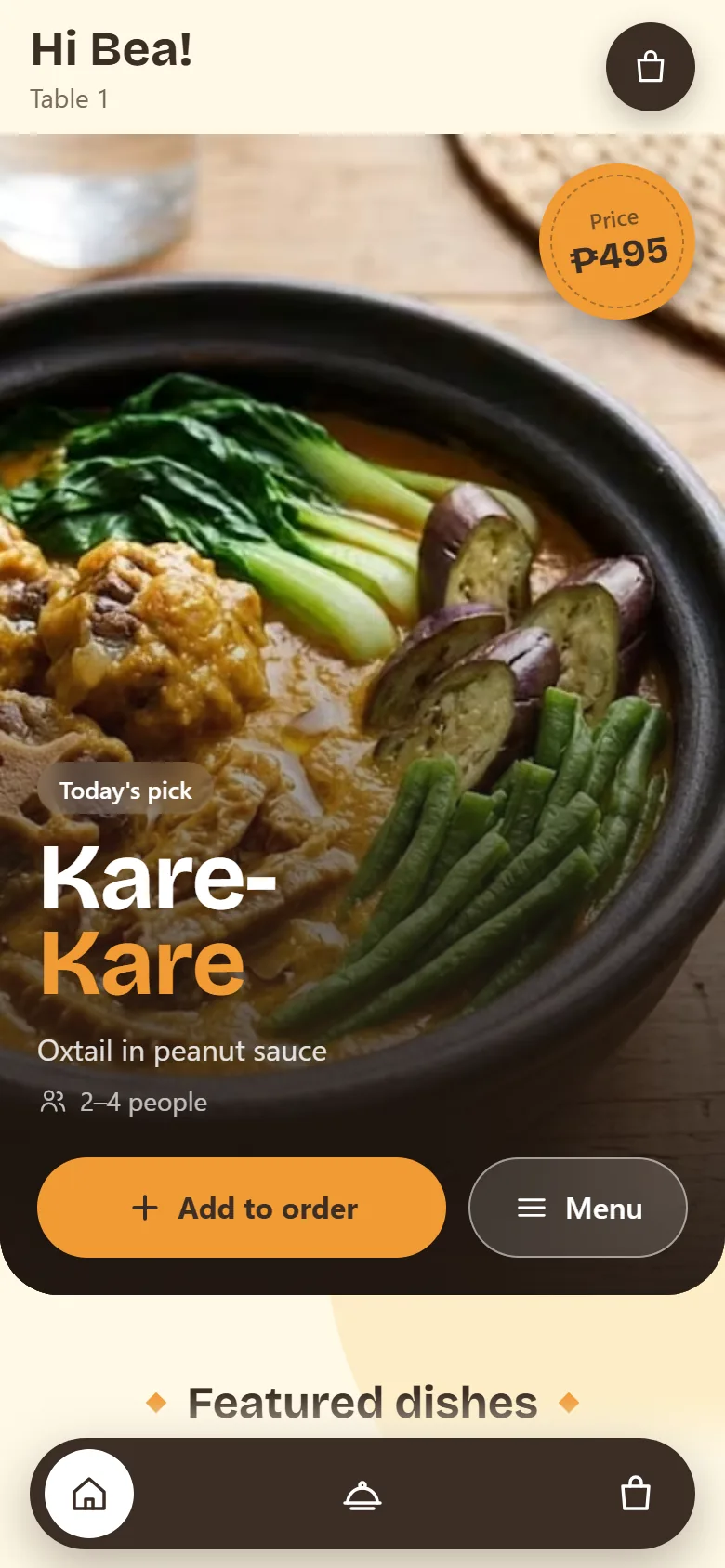
1Tap or scan
The menu opens on the guest's phone, already set to their table.
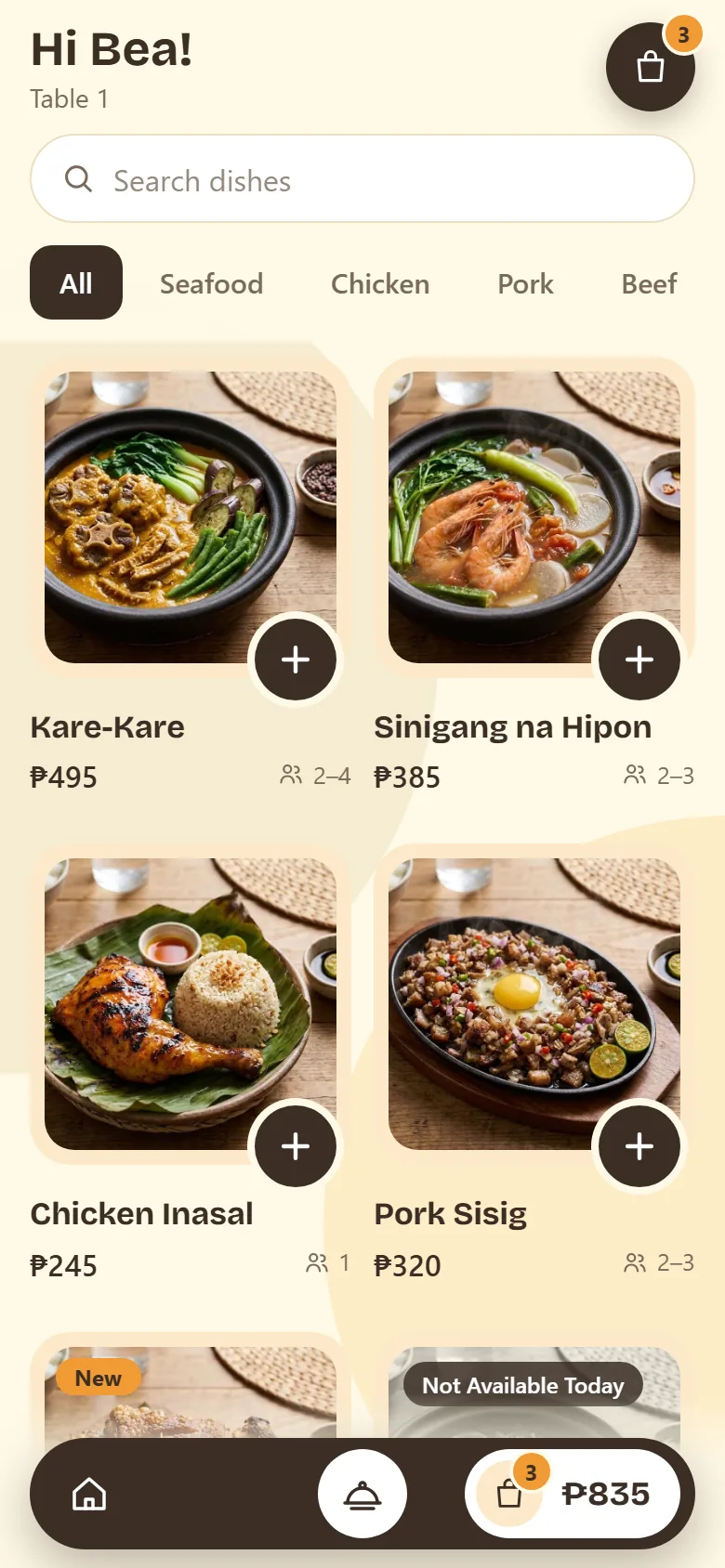
2Pick dishes
Photos, prices, how many each dish feeds, and what's sold out today.
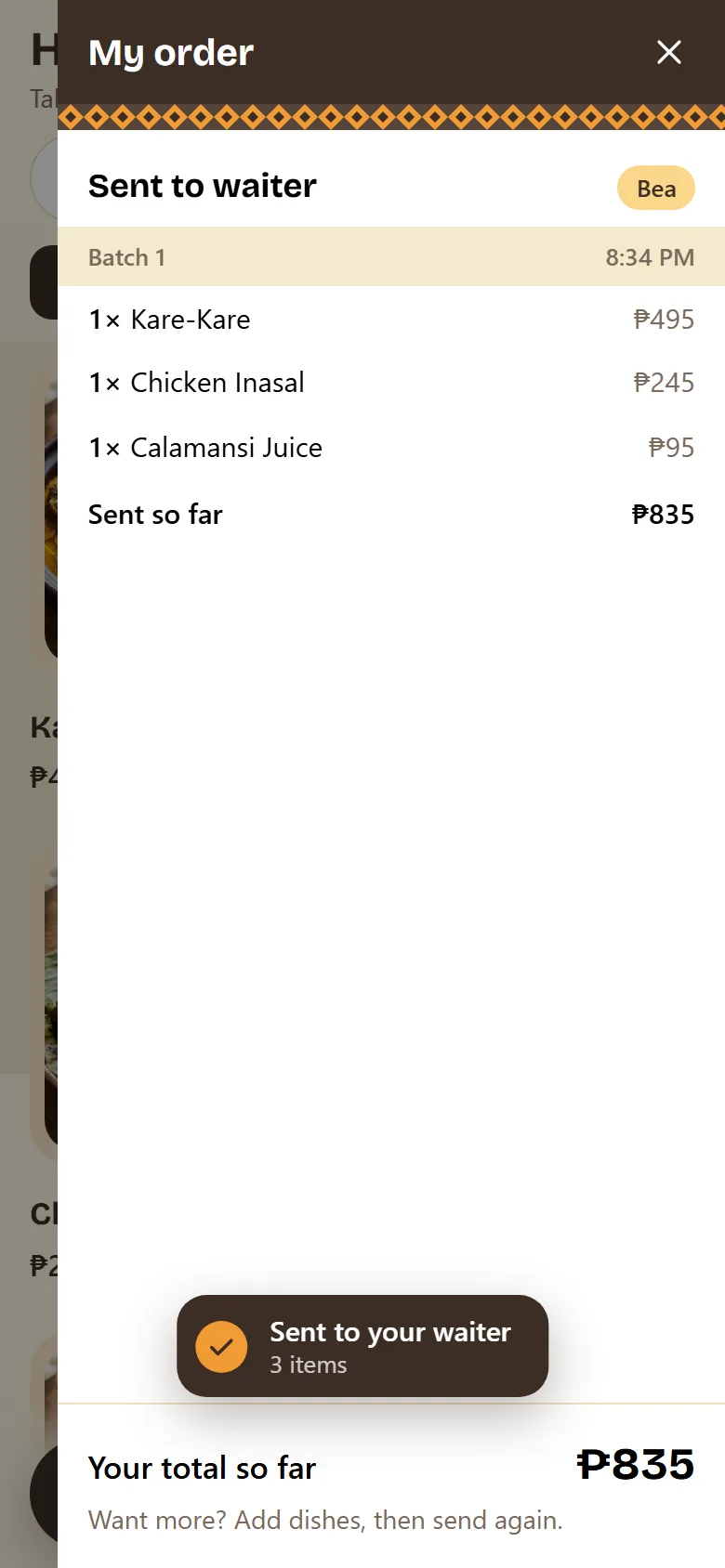
3Send to waiter
Everyone at the table orders from their own phone, in rounds.
4Waiter confirms
Orders arrive by guest. The waiter reads them back and serves.
Try the menu yourself
Scan the code with your phone camera, or open it here. It is the same menu your guests get, with a demo restaurant's dishes.
Open the demo menuGuests order when they're ready, not when a waiter is free. Your staff spend the shift bringing food out instead of writing it down.
Pricing
One price a year for your restaurant or cafe, by how many tables you have. Renew at the same rate to keep your menu online.
Try it free for 7 days on 1 table →Extra tables
Add tables to any plan, one at a time.
₱35 per table a month₱420 a year
Every plan includes
- Menu with photos, online
- Orders straight to the waiter
- A QR code for every table
- Waiter and manager logins
- Sales and busy-hour statistics
Free NFC tags for restaurants in Davao City, Davao del Sur, Davao del Norte and Davao de Oro: guests just tap the table instead of scanning.
Questions restaurant owners ask
What is tapndine?
tapndine ends the idle waiting at the table for restaurants and cafes in the Philippines. Guests scan or tap their table, see every dish on their own phone with its photo, price, spice and how many it feeds, and send their order straight to your waiter. Nobody waits for a menu, a waiter or an answer.
Will guests still talk to my waiters?
Only as much as they want to. The waiter greets the table, confirms the order and brings the food. Nobody has to flag a waiter down for a menu, a question about a dish or another round, and guests can call the waiter from the menu whenever they need one.
How is it different from a QR code menu?
A QR menu only shows the menu. With tapndine, guests also order from it: each order goes to your waiter's phone, sorted by guest, and counts toward your sales statistics. The menu opens already set to their table. Guests scan the table's QR code, and restaurants in Davao City, Davao del Sur, Davao del Norte and Davao de Oro also get NFC tags free, so guests can just tap.
Do guests need to download an app?
No. The menu opens in the phone's browser, on iPhone and Android. Guests do not make an account; they type a name so the waiter knows whose order is whose.
What if a guest's phone can't tap NFC?
Every table has a QR code, so any phone with a camera can open the menu. Where there is an NFC tag, most phones from the last few years can tap it; on some Android phones NFC has to be switched on in settings. A guest without a phone can order on a friend's phone at the same table, or tell the waiter, who adds the dishes to the table's order from their own phone.
Can someone order from outside the restaurant?
The menu link on a guest's phone closes 2 hours after it opens, so a link that was shared or saved stops working. A new tap at the table opens a fresh one. If you ever need to, you can give a table a new link and the old one stops working.
How do I change my menu or mark a dish sold out?
Your manager logs in and adds or edits dishes with a photo, price and how many people each one feeds, sorted into your own categories. A dish can be marked sold out for the day, and guests see it before they ask for it.
What does it cost?
One yearly price by number of tables: ₱3,000 a year for 5 tables, ₱5,000 a year for 10 tables, ₱7,100 a year for 15 tables, ₱8,500 a year for 20 tables. Extra tables on any plan are ₱35 per table a month (₱420 a year). Every plan includes a QR code for each table, waiter and manager logins, and sales statistics. Restaurants in Davao City, Davao del Sur, Davao del Norte and Davao de Oro also get an NFC tag for each table, free. Renew at the same rate to keep your menu online.
Can I try it before I pay?
Yes. Sign up with your email or Google account and you get 7 days free with every feature on 1 table: your menu online, orders to your waiter's phone, and the statistics. Print the table's QR code from your manager login and put it on the table. When the week is up, pick a plan to keep going; your menu and settings stay as you left them. For restaurants in Davao City, Davao del Sur, Davao del Norte and Davao de Oro, the free NFC tags come with a paid plan.
Does tapndine replace my POS?
No. tapndine sits on top of what you already use. Guests' orders arrive on your waiter's phone, and your waiter enters them into your POS as usual, so your POS stays your till and your sales record. If you want a POS or another system built for your restaurant, ask us.
How do I pay?
Once a year, by GCash, Maya, Bank transfer or Cash.
Does tapndine take payment from guests?
No. Guests pay you the way they always have. tapndine sends their orders to your staff and keeps count of what sells.